Multiplayer GameChat — 4v4 Team Battles
Last updated: June 2026
Star Fox Battle Mode on Nintendo Switch 2 delivers the franchise's first structured 4v4 team dogfights with integrated GameChat voice. Whether you queue solo into matchmaking or stack a private squad with friends, success depends on communication, map knowledge, and Arwing fundamentals borrowed from the campaign. This guide explains how to set up GameChat, organize team roles, and win consistently across all three launch arenas.
Getting Online
From the title menu, select Battle Mode, then Online Play. Confirm your Nintendo Switch Online subscription — it is required for internet matchmaking. Switch 2 prompts you to enable GameChat on first launch; accept the system permission to use the controller microphone or a wired headset.
Quick match. Places you in a 4v4 queue with map rotation. The matchmaker balances teams by hidden skill rating after your first ten games.
Private lobby. Invite up to seven friends. The host selects map, win condition (team eliminations or point hold), and whether AI fills empty slots. Enable GameChat in the lobby before ready-check so all eight players share a voice channel.
GameShare guests. Friends playing a GameShare trial can join private lobbies hosted by a full owner but cannot enter ranked quick match queues. See online and GameShare for trial limits.
GameChat Best Practices
GameChat runs at the system layer, not inside individual game menus. During loading screens, confirm your microphone icon is active. Use short callouts:
- "Focus left flank" when two enemies boost toward your spawn
- "Bomb now" before area denial on the Bolse platform map
- "Low health, cover me" when retreating through Meteo rocks
Assign a shot caller if your group queues regularly. One voice reduces overlap. Mute through the GameChat overlay if a player is noisy — harassment reports go through Nintendo's standard moderation channels.
Players without voice should use ping markers (mapped to a shoulder button) and the quick-chat wheel. Pings appear on teammates' HUDs with directional arrows.
Team Roles in 4v4
Unlike the solo campaign where Fox must handle routing, Battle Mode rewards specialization:
| Role | Job | Campaign parallel |
|---|---|---|
| Lead | First into fights, calls targets | Fox on aggressive medal runs |
| Support | Covers lead's six, finishes weak targets | Peppy assist behavior |
| Flanker | Circles wide through cover | Falco-style boost passes |
| Anchor | Holds zone objectives, saves bombs | Sector Z missile defense focus |
Rotate roles between maps. The Corneria skyline arena favors vertical loops; Meteo favors flankers who know rock cover from the Meteo walkthrough; Bolse platform favors anchors who understand shield generator timing from Bolse campaign runs.
Map Tactics
Meteo Asteroid Field. Break line of sight behind rocks, boost through tunnels, and avoid open center duels where four enemies can focus fire. Save barrel rolls for homing missiles.
Corneria Skyline Ring. Use building gaps to lose tailing opponents. Loops over skyscrapers shake pursuers. Do not hug the outer ring — snipers on the opposing team predict that path.
Bolse Defense Platform. Rotating shield segments create temporary cover. Coordinate bombs when two enemies are trapped inside the same generator arc. This map punishes loners who chase kills off-platform.
Detailed spawn locations and objective timers are listed on Battle Mode.
Controls and Aim for PvP
Campaign skills transfer directly: charged shots finish shielded targets faster than tap fire, barrel rolls dodge bomb blasts, and brake U-turns catch fleeing opponents. Enable Joy-Con 2 mouse aiming if stick precision feels sluggish in fast TTK exchanges — the same settings from co-op mouse controls apply online.
Avoid holding boost indefinitely. Skilled players brake-check boosters into asteroid walls on Meteo. Manage bomb economy: whiffing a bomb on a single target leaves your team vulnerable during the next swarm spawn.
Squad Queue Strategy
Full squads of four communicating over GameChat dominate public matchmaking. If you queue solo:
- Drop into quick match for warm-up games.
- Friend players who ping objectives consistently.
- Move the group to private lobbies once you have four regulars.
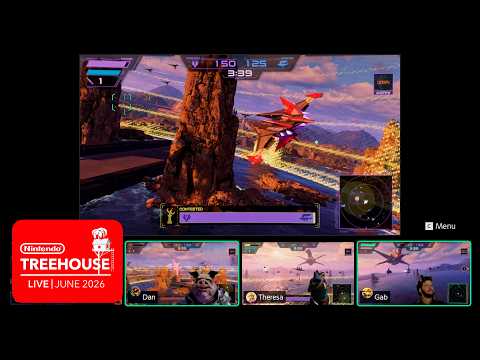
- Watch the embedded reference video above for official Nintendo team callout examples.
Practice controls training drills before ranked-style sessions — muscle memory matters more than loadout cosmetics unlocked from Challenge Mode or amiibo.
Relationship to Campaign
Battle Mode does not alter story saves, medals, or route history. It is parallel content for players who master the Arwing during the hard route or Expert Mode runs. Conversely, campaign experience teaches enemy ship silhouettes and charge-shot timing that win duels online.
When you are ready to return to single-player goals, use the full walkthrough for campaign reference or the true ending guide if your squad wants cooperative story nights after ranked sessions.
Troubleshooting
- Cannot hear teammates: Re-open GameChat overlay and verify input device in Switch 2 system settings.
- Long queue times: Queue during regional peak hours or switch to private lobbies with AI backfill.
- Disconnect penalties: Leaving mid-match applies a temporary matchmaking timeout; finish games or surrender through the pause menu.
For platform-level requirements and lobby error codes, see online and GameShare.
Star Fox Multiplayer GameChat — 4v4 Online Guide
Related Guides
Frequently Asked Questions
Standard matchmaking queues 4v4 team battles — eight pilots total. Private lobbies can fill partial teams with AI backfill on some rule sets, but ranked-style queues require full human teams.
Online Battle Mode requires an active Nintendo Switch Online membership. GameChat voice uses Switch 2 system features layered on top of NSO matchmaking; local wireless play does not require NSO.
Yes. Create a private lobby from the Battle Mode menu, invite friends via friend codes or the Nintendo Switch app, and enable GameChat before searching. The lobby leader picks map and rule set.
Cosmetic banners and backgrounds unlock through campaign medals, Challenge Mode, and amiibo. Core weapons — laser, bomb, boost — are identical for all players in fair matchmaking.
Start as wing support: stay near a stronger teammate, call out targets with pings, and save bombs for cluster moments. Avoid chasing solo kills into asteroid fields on the Meteo map.
Star Fox on Switch 2 is a separate release. Battle Mode matchmaking pools Switch 2 players only. GameShare trials also require Switch 2 hardware.
Open the system GameChat overlay during a match and mute individual participants. You can also disable voice entirely and rely on ping markers and quick-chat lines.